The House Came Wired. Then I Ran Out of Ports.
The House Came Wired. Then I Ran Out of Ports.
When we bought the house in Texas, it already had two Ethernet drops in every room, a UniFi Dream Wall, and two U7 Pro access points. Compared to the collection of hardware I had been making work before the move, that was a pretty good place to start. The original plan was to run everything through the Dream Wall and build the lab around it. There was already wiring in the walls. There was already networking hardware installed. How much work could the network actually need?
Enough that it gets its own post, apparently.
There was no rack or patch panel when we moved in. The house drops had plugs on the ends and went straight into the Dream Wall. Those double drops were great until I realized they used up every port, leaving nowhere to connect the lab or anything else I wanted to add. I had finally bought a house with room for this shit, and the first thing I ran out of was somewhere to plug it in.
That was one problem. The cable tester found the others.
First, Figure Out Where the Cables Actually Go
The labeling on the drops was wrong, and a couple of them didn’t work at all. So before I could do much with the network, I had to go room by room, test both drops, and figure out where each cable actually went. I re-terminated the ends that weren’t working, tested them again, and labeled everything. The far end of each cable now tells me the room and whether it’s the top or bottom drop. Nothing particularly clever. Just information I would prefer to have before I start troubleshooting something else.
I bought a keystone patch panel, punched down the jacks myself, and moved the house drops onto it. The Dream Wall stayed. It worked, and replacing it just so I could claim I built the whole network from scratch would have been a fairly stupid use of money. I have plenty of other places to do that.
The switching took a little longer to settle on. At one point, I tried using several small UniFi switches to consolidate the house connections through a switch in the attic, with a single uplink back to the Dream Wall. It worked. It also turned what should have been a fairly straightforward job into more little boxes and connections than I wanted to deal with. Eventually I dropped that arrangement and put one UniFi 16-port switch in the rack.
That gave me the split I should have planned from the beginning: the house drops on their own switch, with everything else staying on the Dream Wall. The attic switch stayed, mostly for home theater reasons now, but the mini-switch consolidation experiment did not. Sometimes the useful result of trying something is realizing I should have bought the other fucking thing first.
The Rack, Including the Things I’d Buy Again
The rack grew around those decisions. It holds the patch panel and switch, the ISP gateway, the old Synology, power distribution, a CyberPower UPS, and a Pi rack with exactly one Raspberry Pi in it. There’s also a mini PC running Jellyfin, tucked behind one of the Pi rack slots where you won’t see it. Boba Fett is up top, protecting the investment. His contribution to uptime cannot be measured.
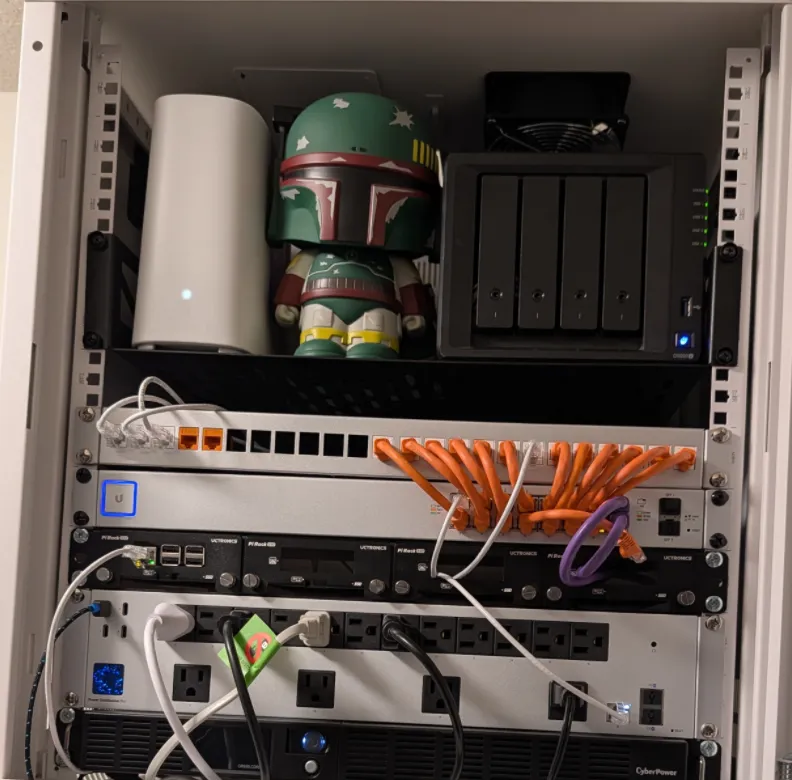
The piece I appreciate more than I expected is the UniFi USP PDU Pro. It wasn’t part of the original plan, but being able to reset an individual outlet or turn a device back on from the app is an underrated feature in a homelab. The UPS gives the rack power protection. The PDU gives me control over individual devices without physically pulling their plugs. Once I had that, it became one of the things I would plan for from the start if I did this again.
The Pi rack went the other direction. It was cheap, it was cute, and it had four slots for projects that haven’t shown up yet. I have one Pi. I could have put it on a small platform near the mini PC and used the space for something else. It fits, so it’s staying for now, but if I need that space, it’s the first thing out.
I also wish the rack was bigger. The fact that I have already identified hardware to evict probably explains why.
Everything Doesn’t Need Access to Everything
Once the physical connections were sorted, I needed to get the network into a state where the household could actually use it while I kept building. The family was already tired of the Wi-Fi outages, and I was tired of disconnecting and reconnecting things. The VLAN structure was the base the rest of the environment needed to sit on, so that had to get settled before I kept adding services.
I separated devices by what they do and what they need to reach. Different devices have different requirements. Putting them all on one flat network would have been easy, but it would also mean giving things access they had no reason to have. An experiment I intend to break should not get the same treatment as infrastructure I depend on.
My approach is to lock things down, then open up the access that’s actually needed. In practice, that sometimes means someone tells me something doesn’t work, and I go figure out exactly what needs to communicate. If a device needs Jellyfin, I allow that device to reach Jellyfin. I don’t open access between two entire networks because one person wants to watch something.
I’m happy with the structure now. That doesn’t mean getting the rules to match what I thought I’d configured was entirely straightforward.
The Checkbox Said It Was Isolated
I found the isolation problem while doing something unrelated. I don’t remember what the original task was, because I noticed traffic going somewhere it shouldn’t and dropped everything to chase that instead. One of the networks was supposed to be isolated. The setting was enabled. Traffic was still getting through.
So I went through the firewall rules, deliberately sent test traffic, and watched the traffic logs. Eventually I found an older allow policy in the zone policy matrix taking precedence over the block. I deleted it, sent the traffic again, and this time it was blocked and dropped the way it should have been from the start.
The rule was mine. The previous owner had transferred the Dream Wall to my account, and I factory-reset it before setting it up. I don’t get to blame somebody else’s configuration for that one. I created it, I don’t remember creating it, and I don’t know why it won over the block. The source and destination directions in the zone matrix took me a while to get used to, so I may have allowed something in the wrong direction while trying to permit access from my side. That’s a theory, not a confirmed explanation.
What I could confirm was that the traffic got through with the policy there and stopped getting through after I removed it. Testing in both directions mattered, because being able to initiate a connection one way doesn’t tell me what can initiate one back. The isolation checkbox had been telling me something reassuring. The actual traffic was much less fucking reassuring.
That was my own stale configuration, found by accident, in a network I thought I had locked down. An excellent review of my work.
What Still Isn’t Finished
The rack solves two problems I had at the start: running out of ports and not knowing exactly what I was looking at. Every drop is tested and labeled now. I don’t have to trace a cable just to find out where it goes, and adding hardware doesn’t immediately mean finding another way to consolidate the house connections. When something breaks, I can start with a physical layer I’ve checked instead of first reverse-engineering my own shit. Hardware can still fail. At least I know what I’m testing.
There are still things I want to change. The 10GbE connection to the main server is currently down because the copper SFP+ module got far too hot to touch. I pulled it and went back to 2.5GbE. I don’t know whether that 10G link will come back. For now, that’s where it stands.
The Synology’s role is still undecided. I go back and forth between retiring it, finding another job for it, or keeping it as another backup device. A backup of a backup isn’t a bad thing, but I haven’t settled on what I want it doing. Eventually I also want to take the ISP gateway out of the path. Home Assistant is on the list too, but it isn’t installed yet, and bringing everything into it is its own project.
Then there’s the offensive lab, which was the reason for building this environment in the first place, approximately 47 detours ago. The network foundation is there, waiting for its first lab VMs. The environment I actually want to build on it still needs to happen. Getting the rest of the infrastructure into a state I can use and troubleshoot has taken a fairly substantial portion of the trip.
I can finally get back to the lab I meant to build.
Assuming I don’t need a bigger rack first.